Chrome Will Now Scan Your Gmail to Autofill Forms
Google's latest Personal Intelligence update turns Chrome's autofill into something closer to a research assistant, pulling confirmation numbers and tracking codes straight from your inbox.
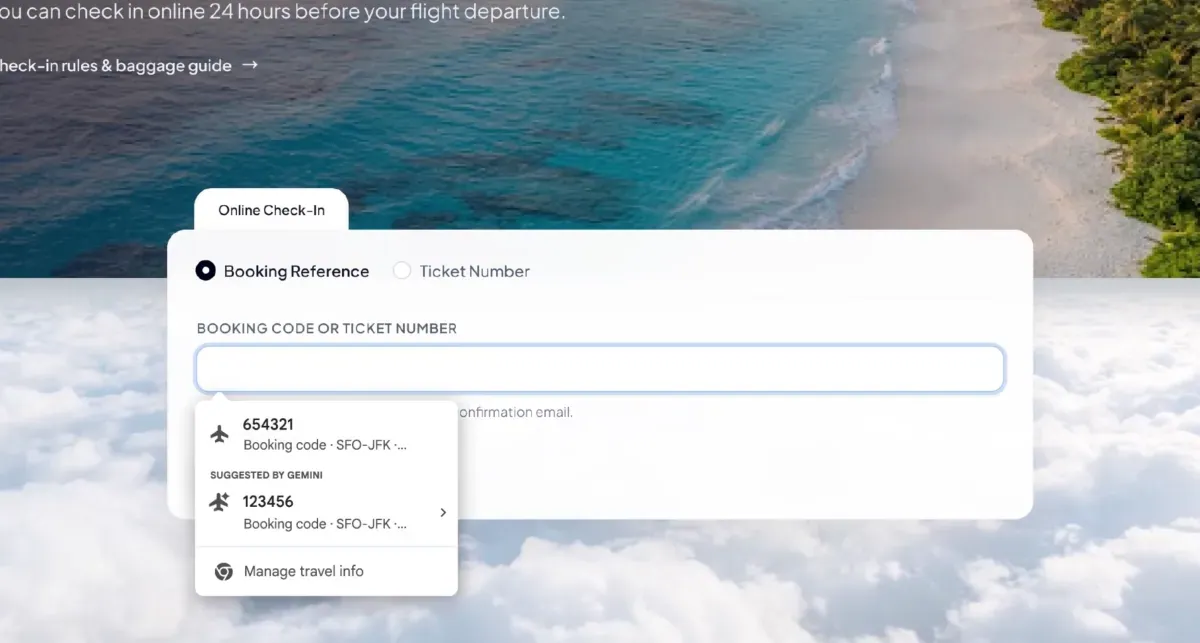
Google is teaching Chrome's autofill feature to read your email. The company announced Wednesday that Chrome will roll out an AI-enhanced version of autofill that pulls information directly from Gmail to help fill out web forms, according to TechCrunch.
The pitch is simple: instead of typing in a flight confirmation number, a membership ID, a tracking number, an order number, or a saved address, phone number, or credit card, Chrome will dig through your inbox and surface the right detail automatically. It's the kind of small, unglamorous update that doesn't generate headlines on its own but could quietly change how often people reach for a browser tab versus a native app.
This isn't a standalone feature. It's an extension of Google's Personal Intelligence system, which already lets users link their Google apps to Gemini, the company's AI assistant, so it can pull specific details and use them to answer more complicated questions. Autofill getting this treatment means the same underlying machinery that powers Gemini's smarter responses is now reaching into the browser's most mundane function: filling out boxes on a web page.
Why this matters more than it looks
Autofill has always been Chrome's quiet workhorse, the thing that saves you from retyping your address or card number for the hundredth time. What's changing is the source of that data. Rather than relying only on information you've manually saved to Chrome, the browser can now go hunting through your Gmail for the specific fact a given form is asking for. A tracking number buried in a shipping confirmation from three weeks ago becomes something Chrome can locate and insert without you having to search your inbox yourself.
TechCrunch draws a useful comparison to one of Apple's more quietly beloved tricks: the way iPhones detect two-factor verification codes sent by text and float them above the keyboard so you can tap them in without copying and pasting. Chrome's new autofill aims for that same kind of friction removal, just applied to a wider range of information sitting in your email rather than a single text message.
The strategic logic is straightforward. Every feature that makes Chrome marginally more convenient is also a reason to keep using Chrome instead of switching browsers, and a reason to stay inside Google's broader AI ecosystem rather than relying on a competitor's assistant. None of this requires users to think about Gemini directly. The AI is working in the background, and the payoff shows up as a form that fills itself out correctly on the first try.
Controls and rollout
Google says the feature is opt-in. Users can turn enhanced autofill on or off from Chrome's settings, and the company states that sensitive data is encrypted. Given that the feature involves an AI system reading through personal email, the opt-in framing and encryption claim are likely to matter to users weighing convenience against how much access they're comfortable granting.
The rollout starts with U.S. users on desktop, as well as in the iOS and Android apps through Gemini in Chrome. There's no word yet on international availability or a broader timeline beyond that initial release.
It's a small feature by itself, but it's a clear signal of where Google wants Chrome to go: less a passive tool for browsing and more an active assistant that reaches into your other Google data to save you a few seconds, a few dozen times a day. Those seconds add up to habit, and habit is exactly what keeps people inside one company's ecosystem instead of another's.