ChatGPT's Chrome Extension Can Now See—and Act On—Your Open Tabs
Days after shutting down its standalone Atlas browser, OpenAI is pushing the same tab-reading powers into a Chrome add-on instead.
OpenAI's ChatGPT Atlas browser didn't last long. Now, the company is folding similar capabilities into something far more people already use: the ChatGPT extension for Google Chrome.
With the extension installed, ChatGPT can read the contents of your open browser tabs whenever you tag Chrome inside a ChatGPT conversation on the web or desktop app, according to OpenAI. In a demo video the company posted, someone asks ChatGPT to compare three open tabs of sofas they're shopping for, and the bot pulls details straight from those pages.
The update also brings ChatGPT into Chrome's sidebar, so it's available without switching away from whatever page you're on. OpenAI says the sidebar version carries "the full power of ChatGPT," including your full conversation history from Chat or Work, directly alongside your browsing.
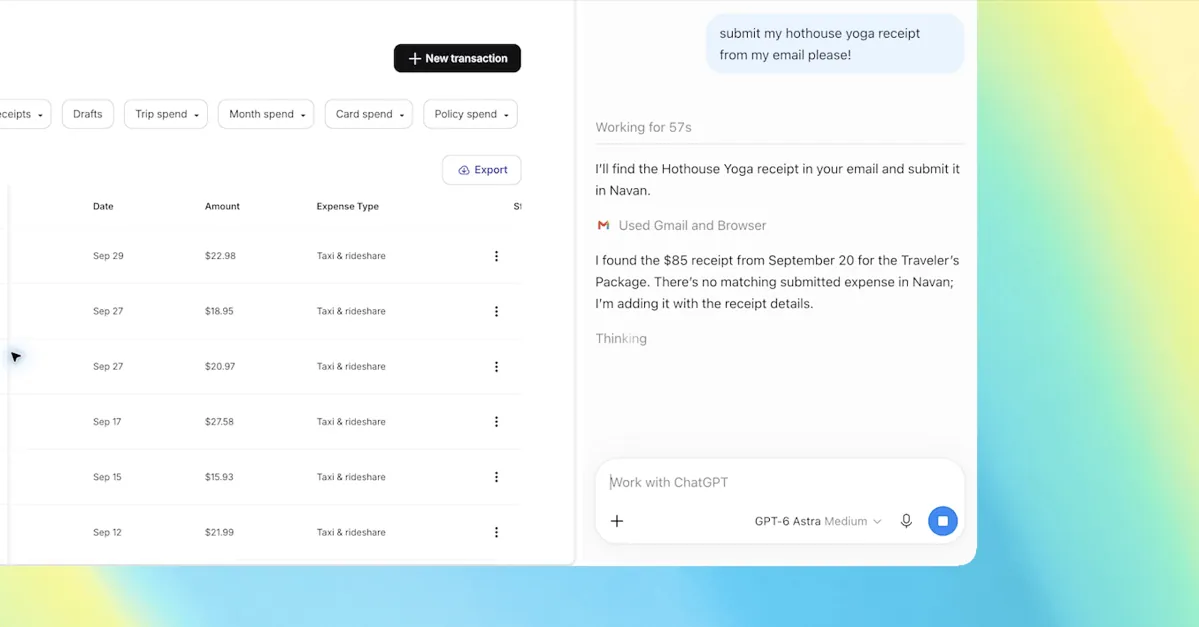
The real shift is in what the extension can do with that tab access. OpenAI lists several sample tasks it's built for: filling out a registration form using details pulled from an event brief in another tab, compiling vendor pricing and features from multiple comparison tabs into a spreadsheet, reading through open contractor-service tabs to draft a follow-up email to the best fit, or completing an intake form ahead of a dentist appointment and then adding that appointment to both a work and personal calendar.
That last category — acting on tabs rather than just reading them — is reserved for ChatGPT Work, OpenAI's tier aimed at business use. There, the extension can "control" Chrome tabs to send messages, fill out forms, or download files, and it can also organize or group the tabs you have open. That puts it in similar territory to Google's own Gemini-powered "auto browse" feature, which handles comparable browser tasks natively inside Chrome.
The timing is notable. OpenAI built Atlas as a full browser specifically so ChatGPT could see and act on whatever was on screen, treating that context as a core feature rather than an add-on. Pulling the same functionality back into an extension suggests the company found more value in meeting users inside the browser they already have than in convincing them to switch browsers entirely. Google, Microsoft, and others have been racing to wire AI assistants directly into existing browsers rather than ship standalone ones, and this move lines OpenAI up with that approach.
For users, the practical upside is skipping a lot of manual copy-paste work: tagging a handful of tabs and letting ChatGPT cross-reference them, instead of toggling between windows to compile information by hand. The tradeoff is the obvious one that comes with letting any AI assistant read your open tabs and, for Work users, click through forms and send files on its own. OpenAI hasn't detailed specific guardrails around that access in this announcement, so how much oversight users get over what the assistant reads or submits remains to be seen as the feature rolls out more broadly.